
Installation Manual Part 2
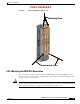


Table Of Contents

PRELIMINARY
6-11
BWX 8415 Basestation Installation and Commissioning Guide
OL-19519-01
Chapter 6 Installation
6.3.4 Mounting the BWX 8415 Basestation
Figure 6-9 BWX 8415 Mounting Bracket
Step 1 Position the mounting bracket on the BWX 8415 and secure the mounting bracket with four bolts, there
are two bolts at the top of the bracket and two bolts at the bottom of the bracket (see
Figure 6-10).
Tighten the bolts to 45 ft-lbs. (61 Nm).
Figure 6-10 Mounting Bracket Positioned on BWX 8415
Step 2 Hoist the BWX 8415 onto the tower. Refer to section 6.3.3 Handling the BWX 8415 Basestation for
hoisting requirements.
Step 3 Position the BWX 8415 on the pole, on the tower and attach the BWX 8415 to the pole using the
mounting hardware on the mounting bracket. Open the anti-seize compound (supplied), and apply a
liberal amount over the metal surface where the mounting hardware and bracket.
Step 4 Ensure the BWX 8415 is vertical, and tighten the four nuts to 45 ft-lbs. (61 Nm). Refer to Figure 6-11.