
Installation Manual Part 2
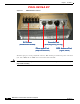
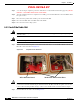
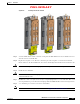
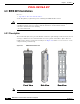
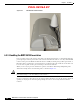
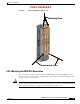
Table Of Contents

PRELIMINARY
6-4
BWX 8415 Basestation Installation and Commissioning Guide
OL-19519-01
Chapter 6 Installation
6.2.3 Install the Radio Unit
Step 7 Once the bootup is completed, perform a calibration to verify the RU is functioning properly. (MORE
DETAILS ONCE FIELD TEST KIT IS AVAILABLE)
Step 8 After the calibration has been completed successfully, power down the RU. Disconnect the RU from the
DC power source.
Step 9 Disconnect the ground cable and DC power leads from the RU.
Step 10 Disconnect the RF cables and GPS cable from the RU.
Step 11 Disconnect the fans/cooling system.
6.2.3 Install the Radio Unit
Warning
Do not work on the system or connect or disconnect cables during periods of lightning activity.
Statement 1001
Warning
Ensure that the power to the RU unit is OFF before installing the unit into the AU.
Step 1 Remove the two lower faceplate covers on the back of the AU, to access the RF calibration board and
RF cable connectors. Refer to
Figure 6-4.
Figure 6-4 Faceplate Covers Removed
Caution Do not attempt to insert the RU into the AU without removing the lower faceplate covers. These faceplate
covers have a mechanical interlock pin, which inserts into the RU, and if the faceplate covers are not
removed when inserting the RU, damage could occur to the RU and the mechanical interlock pins.
Step 2 Insert the RU into the AU, as shown in Figure 6-5.
RF Calibration Board Mechanical Interlock Pin Holes