
Installation Manual Part 2
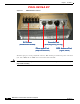
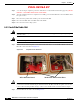
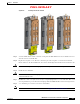
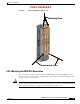
Table Of Contents

PRELIMINARY
6-5
BWX 8415 Basestation Installation and Commissioning Guide
OL-19519-01
Chapter 6 Installation
6.2.3 Install the Radio Unit
Figure 6-5 Inserting the RU into the AU
Step 3 Connect the RF cables and the Cal cable, coming from the RF calibration board, to the RF connectors
and Cal connector on the RU unit.
Step 4 Replace the faceplate covers. Be sure to insert the pin on the faceplate covers into the mechanical
interlock holes on the AU and RU units, these holes should align when the RU is inserted into the AU.
Caution Ensure that the faceplate covers are properly secured to prevent water from leaking into the unit.
Step 5 Install the lower manifold.
Caution Ensure that the lower manifold is properly secured to ensure that the air flow for the heat exchangers is
contained within the unit.
Step 6 Install the I/O cable cover. (It is not necessary to completely tighten these covers at this time. The covers
are being installed to prevent them from swinging while the BWX 8415 Basestation is being hoisted.)
Step 7 Once installed, proceed to the next section of this Guide.
Note To remove the RU, after it has been installed, refer to Appendix F, “Radio Unit Removal”.