
Installation Manual Part 2
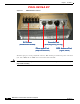
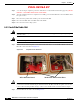
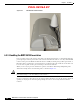
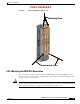
Table Of Contents

PRELIMINARY
6-8
BWX 8415 Basestation Installation and Commissioning Guide
OL-19519-01
Chapter 6 Installation
6.3.3 Handling the BWX 8415 Basestation
Figure 6-7 GPS Antenna Cable Installed
6.3.3 Handling the BWX 8415 Basestation
It is a good idea to inspect the exterior of the AU for any damage that may have occurred during shipping,
prior to placing it at the target site. Each of the antenna elements in the AU are covered by the individual
radomes on the panel. At all times handle the antenna carefully. If, during storage, filter replacement, or
RU replacement, you must place a panel antenna in a position laying down, make sure it rests flat on at
least one inch of plastic foam to prevent damage to the antenna elements.
When you are ready to place the antenna into position, it should be lifted using multiple lift points.
Attach the hoisting cable to the AU’s lift points, as shown in
Figure 6-8.
Caution Never use the radomes to lift, support, or otherwise bear partial or full weight of the BWX 8415
Basestation. Doing so can cause damage to the radomes.
Use two ground-anchor lines attached to the lower mounting bracket to steer the AU and prevent it from
spinning or swaying in the wind and perhaps hitting the tower or other nearby structures with the
radomes.