
Installation Manual Part 5
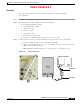
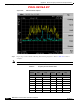

Table Of Contents

PRELIMINARY
D-13
BWX 8415 Basestation Installation and Commissioning Guide
OL-19519-01
Appendix D RF Center Frequency and Interference Analysis Guidelines
Spectrum Analyzer Settings
Procedure
The setup shown in Figure D-10 and the information below are for the post-installation
test configuration.
Step 1 Configure the test equipment as depicted in Figure D-10.
Step 2 Program the initial Spectrum Analyzer settings, per the following.
a. Resolution Bandwidth = 30 KHz
b. Video Bandwidth = 30 KHz
c. Attenuation = 0 db
d. Ref Level = -50 db
e. Sweep Time = auto
f. Detector Mode = positive peak
g. Frequency = determined by which step you are on in the procedure
Step 3 Set the frequency sweep range, as follows. This depends on the frequency you are investigating:
a. Licensed 2.6 GHz = sweep for range 2.596 GHz to 2.644 GHz
b. Other Licensed Frequencies (i.e., 2.3, 2.5, 3.4, 3.5 GHz) = sweep the center frequency plus 6
MHz to check for adjacent channels
c. BWX Basestation Antenna Test Box for any system needs to be set in Rx mode only
Figure D-10 Initial Configuration
Spectrum Analyzer
Test Cable
Test Cable