
Installation Manual Part 5
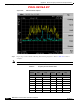

Table Of Contents

PRELIMINARY
D-15
BWX 8415 Basestation Installation and Commissioning Guide
OL-19519-01
Appendix D RF Center Frequency and Interference Analysis Guidelines
Spectrum Analyzer Settings
Try to determine the polarization of the interfering signals during each sweep. To do this, flip the antenna
90 degrees. All captured measurements are with the antenna in the vertical polarization position.
The frequency band to be investigated is determined by the range of the BS that is purchased by a
customer. For example, the 2.6 GHz MMDS band is a licensed band, and the customer purchasing the
equipment will have a license for a given 6 MHz channel.
The sweeps for licensed spectrum are performed to verify that there is not another carrier infringing on
the given licensed channel. If you are performing the sweeps for a licensed channel, it will greatly reduce
the number of steps that you will need to perform. For a licensed spectrum system you only need to look
at 3 channels for the spectrum. You will sweep the licensed channel, as well as the channels above and
below the licensed band.
For ex a m p le:
If you have an E3 license (2.620 GHz – 2.626 GHz), you will sweep E3 plus F2 (2.614 GHz–
2.620 GHz) and F3 (2.626 GHz – 2.632 GHz).
You will only need the Max-hold portion of the procedure for licensed spectrum systems.
Frequency Domain (Max-hold) Test Procedure
Step 1 Check the direction of the antenna with a compass. Record the results.
Step 2 Set the “Start Frequency” to the minimum sweep range for the spectrum you are testing.
Step 3 Set the “Stop Frequency” to the maximum sweep range for the spectrum you are testing.
Step 4 Replace the antenna with a terminator to get a noise floor level. Save a screen capture.
Step 5 Turn on the “Max-hold” feature and acquire the signal for two minutes, and again for 30 seconds. Save
a screen capture in Tiff or Gif format.
Step 6 Run “Single Sweep” 2 times, saving the screen captures for both sweeps. This gives a reference for the
worst case that is shown with the “Max-hold” in Step 5. You can save time on this step if the Spectrum
Analyzer is equipped with a Dual Trace option. Turn on Trace 2 to constant sweep and Trace 1 on
Max-hold. After the Max-hold has acquired a signal for two minutes, press the single sweep. Save the
screen capture. Refer to
Figure D-12, Max-hold Screen Capture.