
User's Manual


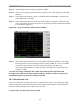

Table Of Contents
- Appendix I: Sample Bill of Materials (BoM)
- Appendix K: RFS System Test (Cable & RFS Sweep)

Navini Networks, Inc. Ripwave Base Station I&C Guide
128
Step 1. Ensure calibration of the test setup has been performed each time the test frequency is
changed.
Step 2. If present, remove the barrel connector from between the Signal Generator and
Spectrum Analyzer cables.
Step 3. Connect the cable from the Signal Generator to one end of the cable. Use a barrel
connector to change the gender, if required.
Step 4. Connect the cable from the Spectrum Analyzer to the other end of the cable. Use a
barrel connector to change the gender, if required.
Step 5. Take a marker measurement on the Spectrum Analyzer by using the ‘marker to peak’
or the ‘peak search’ function. The screen on the Spectrum Analyzer should look similar
to the one shown in Figure K4.
Figure K4: Insertion Loss (Cables on Ground) Marker Measurement Example
Step 6. The result should be within ±0.5 dB of the calculated value. If the insertion loss results
do not agree with the manufacturer’s data, check the connectors for proper connection
to the cable, and check for kinks in the cable. If the Spectrum Analyzer has a distance
to fault (DTF) function, it can be used to help troubleshoot kinks in the cable.
CAUTION! Cables with results greater than the specified limits (i.e., 2 or 3 dB high)
should not be installed, as a potential hardware fault exists.
Step 7. Add the loss for the jumper cable(s) and main cable for each RF path and for the Cal
cable path and record the result in the Cable Loss worksheet.