
User's Manual
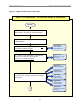
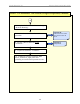
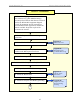
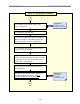
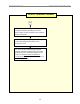
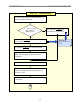
Table Of Contents

Navini Networks, Inc. Ripwave Base Station I&C Guide
27
Phase II: Installation
1 - From the shipping containers received at
the customer site, gather Manufacturing’s
inventory sheet and test data that was collected
before the BTS & RFS equipment shipped.
Verify all equipment arrived (inventory it),
serial numbers match paperwork, and the test
data is available. Keep this as part of the
customer site records.
2 - Install all system buss bars and surge
p
rotecto
r
s.
4 - Install & sweep the RF cables. Record
results on the RFS System Test Form.
5 - Install & sweep the GPS cables.
6 - Test & install the data/power cable (Non-TTA BTS).
7 - If required, install the BTS mounting rack.
8 - Install the BTS chassis.
Appendix K:
RFS System Test
(
cables & RFS swee
p)
Appendix M:
Sample Tri-sector
BTS Grounding
Drawin
g
9 - Install & verify the BTS & RFS grounding.
A
3 - Cut cables. Install connectors on cables.
Appendix J:
Install Connectors
Appendix L:
Chassis Alarms
Information