
User's Manual
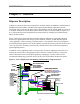
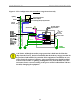
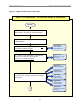
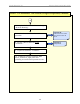
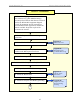
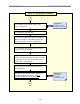
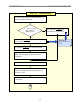
Table Of Contents

Navini Networks, Inc. Ripwave Base Station I&C Guide
28
Phase II: Installation, continued
10 - Install & verify the DC input power
source to the BTS.
11 - Install the GPS antennas.
12 - Sweep the RFS. Record the results & the
RFS serial numbers on the RFS System Test
Form (same form as Step 3, Appendix K).
13 - Install the RFS & surge protectors and
Connect cables to the RFS.
14 - Sweep the installed RFS & cables to
verify connections & cable loss. Record results
on the RFS System Test Form (same form as
Ste
p
s 3 & 11, A
pp
endix K
)
.
15 - Verify that all cards are installed and
seated properly.
16 - Record the serial & version numbers of
the digital and RF/PA cards on the Base
Station Installation Certification Form.
Appendix N:
Sample Tri-sector
BTS Power Drawin
g
Appendix O:
Base Station
Installation
Certification Form
B
A