
User's Manual
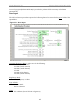
Table Of Contents
- Export BTS Data
- Perform the Calibration Verification Procedure
- Single Antenna Element Test
- Install & Test Customer EMS Operations
- Perform Calibration Using Customer’s EMS
- Verify System Performance
- Verify System Operation With Multiple Modems
- Back Up EMS Database
- Customer Acceptance
- Appendix C: BTS Specifications
- Appendix G: Sample Base Station Drawing
- Appendix H: Antenna Power & Cable Selection

Navini Networks, Inc. Ripwave Base Station I&C Guide
98
Export BTS Data
After successfully calibrating a BTS and before performing the calibration verification
procedure, export the BTS configuration data to a text file. This is done by highlighting the
specific BTS in the Configuration and Alarms Manager (CAM) window, and on the Main Menu
select File > Export BTS Data. This text file will be used as input by the “IC Closeout Tool”
(Part Number 40-00217-00), shown in Appendix V.
Perform the Calibration Verification Procedure
Base Station Calibration Verification is a set of procedures to verify that the equipment has
passed calibration and that the RF portion of the equipment is operating within acceptable
parameters. The results of the tests should be documented in the Base Station Calibration
Verification Form, which is part of the “IC Closeout Tool” (Part Number 40-00217-00).
This procedure is described in Appendix Q.
Single Antenna Element Test
The object of the RFS Single Antenna Element Test Procedure is to verify the functionality of
each antenna element in the Ripwave Radio Frequency Subsystem (RFS). The 8 antenna
elements work together to create the beam forming effect that results from using a Smart
Antenna - Phased Array technology. Using 8 combined antenna elements concentrates the beam
of radiation, adding up to 9 dB of gain, both in the downlink and in the uplink
In the downlink there is an additional 9 dB of gain because there are 8 antenna elements
transmitting simultaneously in the RFS. This gain is not available in the uplink because there is
only one antenna element transmitting at any time in the Modem.
In a Non-TTA BTS, each antenna element has an associated Low Noise Amplifier (LNA) in the
RFS and a Power Amplifier (PA) in the RF Shelf of the BTS. In a TTA BTS, each antenna
element has an associated PA in the RFS and an RF Converter (RFC) in the BTS shelf. In order
to verify that each individual antenna element is working properly, we have to power off the
LNA/PA/RFCs for all the antenna elements, then turn them on individually one at a time and
verify that a test Modem can communicate with the base station through that single antenna
element (Appendix R
).
Install & Test Customer EMS Operations
If you have been using a Test EMS up to this point, you will now need to install and test the
customer’s EMS server. This involves installing the EMS Server and Client on a computer that is
connected through the system backhaul. When connecting the Ripwave equipment to the