
User's Guide
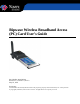
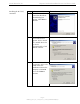
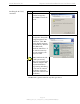
Table Of Contents
- Permissions, Trademarks & Distribution
- Safety
- Regulatory Information
- Introduction
- Package Inventory
- Ripwave Models
- Minimum Computing Requirements
- Physical Characteristics
- Installing the PC Card on Windows 2000
- Accessing the Internet
- Disconnecting the PC Card
- Indicator Light
- Troubleshooting
- Installing Navini Diagnostics (NavDiag) Software
- Using Navini Diagnostics
- Uninstalling Navini Diagnostics Software
- Optional Desktop Antenna
- Care and Maintenance
- Upgrading the PC Card
- ADDENDUM 1: PC Card - PC Troubleshooting
- ADDENDUM 2: End User Software License Agreement

Navini Networks, Inc. Ripwave Wireless Broadband Access Card User’s Guide
Page 10
050525_pv1.2_PC_Card_User’s_Guide_40-00292-00b(4.3)
Installing the PC Card,
continued
Step Action Illustration
7.
The Driver Files Search
Results box appears.
Click Next to install the
driver.
Windows 2000 Screen
8.
The Hardware Install
box appears, along with
a Digital Signature Not
Found box. Click Yes
on the Digital Signature
Not Found box, and then
click Yes on the
Hardware Install box. If
the sound is turned up
on your computer, two
beeps are heard.
Note: Windows 98, XP,
or ME systems may
show a screen stating the
PCMCIA Adapter* has
not passed Windows
Logo testing and asking
if you want to continue
installation. Select the
option that continues the
installation.
Windows 2000 Screen
*PCMCIA is a generic name for any NIC type device.