
User's Guide
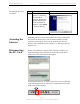
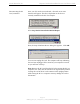
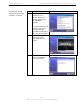
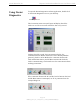
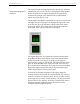
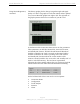
Table Of Contents
- Permissions, Trademarks & Distribution
- Safety
- Regulatory Information
- Introduction
- Package Inventory
- Ripwave Models
- Minimum Computing Requirements
- Physical Characteristics
- Installing the PC Card on Windows 2000
- Accessing the Internet
- Disconnecting the PC Card
- Indicator Light
- Troubleshooting
- Installing Navini Diagnostics (NavDiag) Software
- Using Navini Diagnostics
- Uninstalling Navini Diagnostics Software
- Optional Desktop Antenna
- Care and Maintenance
- Upgrading the PC Card
- ADDENDUM 1: PC Card - PC Troubleshooting
- ADDENDUM 2: End User Software License Agreement

Navini Networks, Inc. Ripwave Wireless Broadband Access Card User’s Guide
Page 11
050525_pv1.2_PC_Card_User’s_Guide_40-00292-00b(4.3)
Installing the PC Card,
continued
Accessing the
Internet
Disconnecting
the PC Card
Step Action Illustration (using LED Modem)
9. After the files are
copied, a Completing
the Found New
Hardware Wizard box
appears indicating the
driver installation is
complete. Click Finish
to close the Wizard.
Windows 2000 Screen
Assuming you have service from a Service Provider, you should be
able to surf the Internet once your PC Card is installed, and the
computer is powered on! To access the Internet, open the web
browser that is installed on your computer, i.e., Netscape, Internet
Explorer, etc.
Before you pull the PC Card out of the computer card slot, you
must first stop the driver software. If you do not stop the driver
software first, the following box will appear:
To safely disconnect the PC Card, click on the Card icon indicated
in the following illustration. This icon is located in the lower right-
hand corner of the computer.