
User's Guide
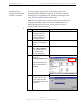
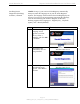
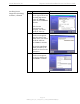
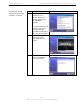
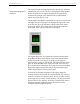
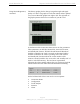
Table Of Contents
- Permissions, Trademarks & Distribution
- Safety
- Regulatory Information
- Introduction
- Package Inventory
- Ripwave Models
- Minimum Computing Requirements
- Physical Characteristics
- Installing the PC Card on Windows 2000
- Accessing the Internet
- Disconnecting the PC Card
- Indicator Light
- Troubleshooting
- Installing Navini Diagnostics (NavDiag) Software
- Using Navini Diagnostics
- Uninstalling Navini Diagnostics Software
- Optional Desktop Antenna
- Care and Maintenance
- Upgrading the PC Card
- ADDENDUM 1: PC Card - PC Troubleshooting
- ADDENDUM 2: End User Software License Agreement

Navini Networks, Inc. Ripwave Wireless Broadband Access Card User’s Guide
Page 14
050525_pv1.2_PC_Card_User’s_Guide_40-00292-00b(4.3)
Installing Navini
Diagnostics (NavDiag)
Software, continued
If you are going to upgrade your PC Operating System after
loading the Navini Diagnostics software, you must first uninstall
NavDiag prior to upgrading the OS. Otherwise, NavDiag will not
work. See Uninstall instructions in this Guide.
Note: The screenshots shown in these instructions were taken from
a laptop with Windows 2000. If you have a Windows 98, XP, or
ME operating system, the screens you see may vary from the
screens shown in the instructions.
•
Step Action Illustration
1. Shut down all programs,
including anti-virus
software programs,
before installing the
NavDiag software.
2. Insert the Installation
CD into the CD-ROM
drive.
3. Open the CD by clicking
on the My Computer
icon. Double-click on
the folder named
Navini_Diagnostics.
4. Double-click on the icon
for the file
navdiag_windows.exe*.
This will automatically
start the installation of
NavDiag.
Example
5. The InstallAnywhere
window appears. The
progress bar indicates
that InstallAnywhere has
initialized.
Windows 2000 Screen
Doubleclick
this file.