
User's Guide
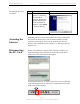
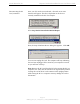
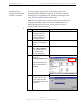
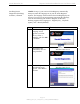
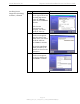
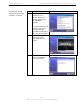
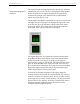
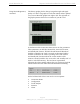
Table Of Contents
- Permissions, Trademarks & Distribution
- Safety
- Regulatory Information
- Introduction
- Package Inventory
- Ripwave Models
- Minimum Computing Requirements
- Physical Characteristics
- Installing the PC Card on Windows 2000
- Accessing the Internet
- Disconnecting the PC Card
- Indicator Light
- Troubleshooting
- Installing Navini Diagnostics (NavDiag) Software
- Using Navini Diagnostics
- Uninstalling Navini Diagnostics Software
- Optional Desktop Antenna
- Care and Maintenance
- Upgrading the PC Card
- ADDENDUM 1: PC Card - PC Troubleshooting
- ADDENDUM 2: End User Software License Agreement

Navini Networks, Inc. Ripwave Wireless Broadband Access Card User’s Guide
Page 17
050525_pv1.2_PC_Card_User’s_Guide_40-00292-00b(4.3)
Installing the Navini
Diagnostics (NavDiag)
Software, continued
Step Action Illustration
12. The Pre-Installation
Summary screen
appears. Review the
contents for accuracy.
Click Install to
continue.
For your installation and
computer, this screen
may have different
information than what is
shown in the illustration.
Windows 2000 Screen
13. The Installing screen
will change as the
application files are
loaded.
Windows 2000 Screen
14. At the Install Complete
screen, click Done to
close the window.
Windows 2000 Screen