
User's Guide
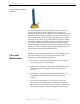
Table Of Contents
- Permissions, Trademarks & Distribution
- Safety
- Regulatory Information
- Introduction
- Package Inventory
- Ripwave Models
- Minimum Computing Requirements
- Physical Characteristics
- Installing the PC Card on Windows 2000
- Accessing the Internet
- Disconnecting the PC Card
- Indicator Light
- Troubleshooting
- Installing Navini Diagnostics (NavDiag) Software
- Using Navini Diagnostics
- Uninstalling Navini Diagnostics Software
- Optional Desktop Antenna
- Care and Maintenance
- Upgrading the PC Card
- ADDENDUM 1: PC Card - PC Troubleshooting
- ADDENDUM 2: End User Software License Agreement

Navini Networks, Inc. Ripwave Wireless Broadband Access Card User’s Guide
Page 25
050525_pv1.2_PC_Card_User’s_Guide_40-00292-00b(4.3)
Optional Desktop Antenna,
continued
Care and
Maintenance
To connect the desktop antenna to the PC Card, you must first
remove the antenna attached to the PC Card. To remove the
antenna, grasp the base of the antenna near its connection point and
then firmly pull the antenna away from the card. Do not grasp the
top or middle of the antenna as it may break when you try to pull
the antenna away. Once the PC Card antenna is removed, connect
the desktop antenna by inserting its connector into the port on the
PC Card. If a desktop antenna is required for optimal reception,
avoid frequently connecting and disconnecting the desktop antenna
from the PC Card as frequent connection/disconnection may cause
the connector on the desktop antenna to break.
The Ripwave Wireless Broadband Access Card is designed to give
years of trouble-free service. To ensure operation, read the
following care and maintenance instructions.
Keep the PC Card free of dust and moisture. If the Card gets
wet, use a towel to dry it immediately.
Handle the PC Card gently. Dropping it or mishandling it can
cause damage to the metal/plastic shell or the electronic
circuitry.
Keep the PC Card away from high temperatures. Heat can
cause damage to the metal/plastic shell or the electronic
circuitry.
To clean the external areas of the PC Card, use only an
electrical contact cleaner that is non-conductible and a soft,
damp, lint-free cloth. Do not use any chemicals or abrasives to
clean the Card. Also use caution around the connection pins.