
User's Guide
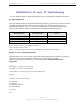
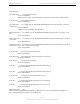
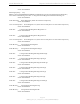
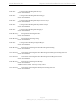
Table Of Contents
- Permissions, Trademarks & Distribution
- Safety
- Regulatory Information
- Introduction
- Package Inventory
- Ripwave Models
- Minimum Computing Requirements
- Physical Characteristics
- Installing the PC Card on Windows 2000
- Accessing the Internet
- Disconnecting the PC Card
- Indicator Light
- Troubleshooting
- Installing Navini Diagnostics (NavDiag) Software
- Using Navini Diagnostics
- Uninstalling Navini Diagnostics Software
- Optional Desktop Antenna
- Care and Maintenance
- Upgrading the PC Card
- ADDENDUM 1: PC Card - PC Troubleshooting
- ADDENDUM 2: End User Software License Agreement

Navini Networks, Inc. Ripwave Wireless Broadband Access Card User’s Guide
Page 27
050525_pv1.2_PC_Card_User’s_Guide_40-00292-00b(4.3)
ADDENDUM 1: PC Card - PC Troubleshooting
- For Use With the Ripwave Wireless Broadband Access Card & Navini Diagnostics Software -
PC Operating Systems
Prior to installing the Navini Diagnostics (NavDiag) software, please check to ensure that the PC
Operating System meets the criteria given in the table below. If these criteria are not met,
unpredictable problems may occur as a result of installation. It is recommended that the user
have the latest Windows
c
updates installed prior to installing the NavDiag software.
Operating System PC Card Interface Notes
Win98, 2nd edition Supported 1
WinME Supported 1
Win 2000 Supported 1, 3
Win XP Supported 2, 3
Note 1: Internet Explorer 3.0 or higher is required
Note 2: Requires Service Pack 1
Note 3: To load the NavDiag software, the user MUST have Administrative privileges.
Results of Correct NavDiag Installation
Experienced PC users can check the results of the Navini Diagnostics installation by looking at
the log file that is created during the installation process. The log file is named
“Ripwave_Diagnostics_InstallLog.log.” It is located under c:\Program Files\Navini
Diagnostics.
-------
Install Begin: Tue Jul 20 12:15:22 CDT 2004
Install End: Tue Jul 20 12:15:30 CDT 2004
Created with Zero G's InstallAnywhere 4.5.3 Enterprise Build 1394
Summary
-------
Installation: Successful with warnings.
2 SUCCESSES
1 WARNINGS
0 NONFATAL ERRORS
0 FATAL ERRORS
Action Notes:
None.