
User's Guide
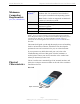
Table Of Contents
- Permissions, Trademarks & Distribution
- Safety
- Regulatory Information
- Introduction
- Package Inventory
- Ripwave Models
- Minimum Computing Requirements
- Physical Characteristics
- Installing the PC Card on Windows 2000
- Accessing the Internet
- Disconnecting the PC Card
- Indicator Light
- Troubleshooting
- Installing Navini Diagnostics (NavDiag) Software
- Using Navini Diagnostics
- Uninstalling Navini Diagnostics Software
- Optional Desktop Antenna
- Care and Maintenance
- Upgrading the PC Card
- ADDENDUM 1: PC Card - PC Troubleshooting
- ADDENDUM 2: End User Software License Agreement

Navini Networks, Inc. Ripwave Wireless Broadband Access Card User’s Guide
Page 7
050525_pv1.2_PC_Card_User’s_Guide_40-00292-00b(4.3)
Minimum
Computing
Requirements
(See, also, Addendum 1)
Physical
Characteristics
Operating
System
1
:
Windows 98SE, Windows 2000, Windows ME, or
Windows XP. It is assumed the latest Windows
service pack is installed on the Operating System.
Note: The PC Card is not supported on MacIntosh
systems or Linux/Unix systems.
CPU:
Pentium level or higher
RAM:
32 MB or the Operating System minimum,
whichever is greater
Hard Drive:
50 MB free disk space for the optional Navini
Diagnostics software
Monitor:
256 colors, 800 x 600 resolution
NOTE
1
: If you are going to upgrade your Operating System after loading the
Navini Diagnostics software, you must first uninstall Navini Diagnostics prior to
upgrading the OS. Otherwise, the Wireless Modem Card will continue to
operate, but the Navini Diagnostics will not work. See Uninstall instructions in
this Guide.
This manual will guide you through the simple process of installing
the PC Card and driver software, which have been developed to
optimize the ease and convenience for you, our valued customer.
If you experience any difficulties with your card, refer to the
Troubleshooting sections of this guide. If further assistance is
needed, please contact your Service Provider or the vendor from
whom you obtained your PC Card.
The PC Card fits into a standard Type II PC network interface card
(NIC) slot. A 68-pin connector resides on the end of the card that is
inserted into the slot.
PC Card
68-pin connector