
User's Guide
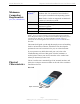
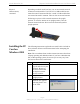
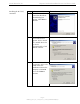
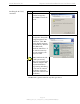
Table Of Contents
- Permissions, Trademarks & Distribution
- Safety
- Regulatory Information
- Introduction
- Package Inventory
- Ripwave Models
- Minimum Computing Requirements
- Physical Characteristics
- Installing the PC Card on Windows 2000
- Accessing the Internet
- Disconnecting the PC Card
- Indicator Light
- Troubleshooting
- Installing Navini Diagnostics (NavDiag) Software
- Using Navini Diagnostics
- Uninstalling Navini Diagnostics Software
- Optional Desktop Antenna
- Care and Maintenance
- Upgrading the PC Card
- ADDENDUM 1: PC Card - PC Troubleshooting
- ADDENDUM 2: End User Software License Agreement

Navini Networks, Inc. Ripwave Wireless Broadband Access Card User’s Guide
Page 8
050525_pv1.2_PC_Card_User’s_Guide_40-00292-00b(4.3)
Physical
Characteristics,
continued
Installing the PC
Card on
Windows 2000
Depending on which model you have, one or two internal inverted-
F antennas reside inside the card. The 2.5-2.6 GHz model has one
internal inverted F antenna while the 3.4 and 3.5 GHz models have
two internal inverted F antennas. There is also an external antenna.
Following is a picture of the external antenna in the upright
position. To raise the antenna to its upright position, raise the
antenna counterclockwise. Do not turn the antenna beyond its
upright position.
The following instructions explain how to install a PC Card and its
driver software. Please read all instructions before attempting the
installation.
Note: The screenshots shown in these instructions were taken from
a laptop operating with Windows 2000. If you have a Windows 98,
XP, or ME operating system, the screens you see may vary from
the screens shown in the instructions.
Step Action Illustration
1. Insert the card into the
Type II card slot on your
computer. Be sure to
insert the end that has
the 68-pin connector
into the card slot.
2. Raise the antenna to the
upright position.
3. The Found New
Hardware box appears
indicating the PC sees
the PC Card.
Windows 2000 Screen