
User's Guide
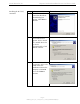
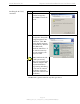
Table Of Contents
- Permissions, Trademarks & Distribution
- Safety
- Regulatory Information
- Introduction
- Package Inventory
- Ripwave Models
- Minimum Computing Requirements
- Physical Characteristics
- Installing the PC Card on Windows 2000
- Accessing the Internet
- Disconnecting the PC Card
- Indicator Light
- Troubleshooting
- Installing Navini Diagnostics (NavDiag) Software
- Using Navini Diagnostics
- Uninstalling Navini Diagnostics Software
- Optional Desktop Antenna
- Care and Maintenance
- Upgrading the PC Card
- ADDENDUM 1: PC Card - PC Troubleshooting
- ADDENDUM 2: End User Software License Agreement

Navini Networks, Inc. Ripwave Wireless Broadband Access Card User’s Guide
Page 9
050525_pv1.2_PC_Card_User’s_Guide_40-00292-00b(4.3)
Installing the PC Card,
continued
Step Action Illustration
4. The Welcome to the
Found New Hardware
Wizard dialog box
appears. Click Next to
continue.
Windows 2000 Screen
5. The Install Hardware
Device Drivers box
appears. Select ‘Search
for a suitable driver for
my device
(recommended).’ Click
Next to continue.
Windows 2000 Screen
6. The Locate Driver Files
box appears. Select ‘CD
ROM.’ Insert the
Installation CD into the
computer’s CD-ROM
drive. Click Next to
continue.
Windows 2000 Screen