
User Guide





13
Warning
Invisible laser radiation may be emitted from disconnected fibers or connectors. Do not stare into beams or view
directly with optical instruments.
Statement 1051
Warning
Class 1 laser product.
Statement 1008
Warning
Class 1 LED product.
Statement 1027
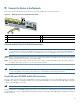
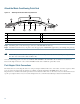
Figure 12 Inserting the Gigabit Ethernet SFP GBIC Cables
Note There is no support for copper-based SFP GBICs (1000BASET) as these do not conform to the SFP GBIC standard and
have not been validated by Cisco.
Step 1 Remove the SFP GBIC plug.
Step 2 Attach the appropriate optical fiber cable directly to SFP GBIC module. You can use either simplex or duplex
connectors for most devices.
• Two cables are required for simplex connectors, one cable for transmit (TX) and one for receive (RX).
• One cable that has both TX and RX connectors is required for duplex connectors.
Use a Category 5 unshielded twisted pair cable with RJ-45 connector, if you are using a Cisco 1000BASE-T SFP.
Caution If you plan to use a GLC-LH-SM at distances greater than 984.25 feet (300 meters) over 50/125-micron or
62.5/125-micron multimode fiber, to prevent data transmission problems you must use the mode-conditioning
patch cord.
1
To external 1000BASEX network
4
Gigabit Ethernet SFP GBIC port 0/1
2
1 duplex connector (TX and RX)
5
RX
3
SFP GBIC module
6
TX
RJ45 EN
LINK
TX
RX
GBIC
GIGABIT ETHERNET 0/2
LINK
TX RX
GBIC
ABIT ETHERNET 0/0
RJ45 EN
LINK
TX RX
GBIC
GIGABIT ETHERNET 0/1
CISCO 7400
SERIES
CISCO 7411
CONSOLE
AUX
CO
FL
80749
1 3
4
6
2
5