
Network Router User Manual






1-11
Cisco 7609 Internet Router Installation Guide
OL-5079-04
Chapter 1 Product Overview
Cisco 7600 Internet Router Components
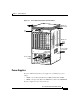
Figure 1-4 DC-Input Power Supply
Load Sharing
When you install and turn on two power supplies, each power supply concurrently
provides approximately half of the required power to the system. If one power
supply fails, the second power supply immediately assumes full power to maintain
uninterrupted system operation. Installing the second power supply enables load
sharing and fault tolerance automatically; no software configuration is required.
Note For proper load-sharing operation in a redundant power supply configuration,
you must install two modules in the chassis. If you fail to install two modules,
you might receive spurious OUTPUT FAIL indications on the power supply.
For information about the power management feature and individual module
power consumption, refer to the Cisco 7600 Series Internet Router Software
Configuration Guide.
16028
Power
switch
DC power cable
terminal block
Terminal block
cover
IN
P
U
T
O
K
F
A
N
O
K
O
U
T
P
U
T
F
A
IL
I
0
Status LEDs
Captive installation
screw