
User's Manual


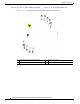
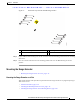



Table Of Contents
- Contents
- Preface
- Overview
- Installation
- Preparing for Installation
- Unpacking the Components
- Installation Guidelines
- Installing the Devices
- Connecting the Protective Ground and Power
- Wiring the Alarm Circuits
- Connecting to Device Ports

29/OCT/2014 REVIEW DRAFT — CISCO CONFIDENTIAL
2-12
Cisco IR500 Series WPAN Gateway and Range Extender Installation and Configuration Guide
Chapter 2 Installation
Installing the Devices
Figure 2-3 Positioning the WPAN Gateway on the DIN Rail
1
3
391285
2
1 DIN rail mounting bracket lower lip 3 DIN rail mounting bracket upper lip
2 DIN rail
Step 3 Place the upper lip of the DIN mounting bracket over the upper edge of the DIN rail. Release the pressure
on the lower lip. The WPAN Gateway will mount onto the DIN rail as shown in Figure 2-4.