
User's Manual


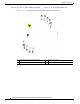
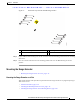
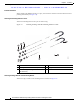

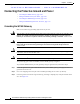


Table Of Contents
- Contents
- Preface
- Overview
- Installation
- Preparing for Installation
- Unpacking the Components
- Installation Guidelines
- Installing the Devices
- Connecting the Protective Ground and Power
- Wiring the Alarm Circuits
- Connecting to Device Ports

29/OCT/2014 REVIEW DRAFT — CISCO CONFIDENTIAL
2-15
Cisco IR500 Series WPAN Gateway and Range Extender Installation and Configuration Guide
Chapter 2 Installation
Installing the Devices
Figure 2-6 WPAN Gateway with Side Wall Mounting Brackets
1
1
3
3
3
3
2
2
2
2
391201
1 Side wall mounting bracket 3 Mounting holes
2 Attachment screws
Step 2 Prepare M8 threaded mounting holes on the wall or the associated mounting plate based on the mounting
dimensions.
Step 3 Place the extender and brackets in the mounting position and screw the M8 mounting screws into
position.
Mounting the Range Extender
• Mounting the Range Extender on a Pole, page 2-15
Mounting the Range Extender on a Pole
This section includes all the procedures required to mount the range extender on any supported pole type.
This section covers:
• Extender Orientation, page 2-16
• Attaching the Mounting Bracket to a Pole, page 2-16
• Attaching the Range Extender to the Mounting Bracket, page 2-16