
User's Manual


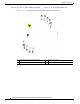
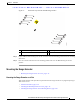



Table Of Contents
- Contents
- Preface
- Overview
- Installation
- Preparing for Installation
- Unpacking the Components
- Installation Guidelines
- Installing the Devices
- Connecting the Protective Ground and Power
- Wiring the Alarm Circuits
- Connecting to Device Ports

29/OCT/2014 REVIEW DRAFT — CISCO CONFIDENTIAL
2-16
Cisco IR500 Series WPAN Gateway and Range Extender Installation and Configuration Guide
Chapter 2 Installation
Installing the Devices
Extender Orientation
When mounting the WPAN extender on a pole, ensure that the extender is oriented with the antenna
pointing downwards (see Figure 2-8).
Attaching the Mounting Bracket to a Pole
Attach the mounting bracket to the pole as shown in Fig.
Figure 2-7 Attaching the Range Extender Mounting Bracket to a Pole
1
2
3
4
5
6
391281
1 Pole 4 Washer
2 U bolt (part number 62-2766-01) 5 Spring loaded washer
3 Pole mounting bracket (part number
70
0-45850-01)
6 Nut
Attaching the Range Extender to the Mounting Bracket
Attach the range extender to the mounting bracket as shown in Figure 2-8.