
User's Manual


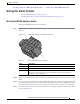
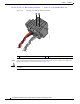
Table Of Contents
- Contents
- Preface
- Overview
- Installation
- Preparing for Installation
- Unpacking the Components
- Installation Guidelines
- Installing the Devices
- Connecting the Protective Ground and Power
- Wiring the Alarm Circuits
- Connecting to Device Ports

29/OCT/2014 REVIEW DRAFT — CISCO CONFIDENTIAL
2-25
Cisco IR500 Series WPAN Gateway and Range Extender Installation and Configuration Guide
Chapter 2 Installation
Connecting the Protective Ground and Power
Warning
This equipment must be grounded. Never defeat the ground conductor or operate the equipment in the
absence of a suitably installed ground conductor. Contact the appropriate electrical inspection
authority or an electrician if you are uncertain that suitable grounding is available.
Statement 1024
Warning
Installation of the equipment must comply with local and national electrical codes.
Statement 1074
The range extender is shipped with a grounding kit as shown in Figure 2-16.
Figure 2-16 WPAN Range Extender Grounding Kit Contents
300622
1 2
1 Grounding lug
2 Screws x 2
Note You can perform these steps when the mounting bracket security panel is installed.
To ground the range extender, follow thes
e steps:
Step 1 Use a crimping tool to crimp the 6-gauge ground wire (included in the grounding kit) to the grounding
lug. See Figure 2-17.