
User's Manual
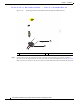
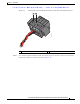
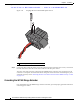


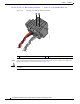
Table Of Contents
- Contents
- Preface
- Overview
- Installation
- Preparing for Installation
- Unpacking the Components
- Installation Guidelines
- Installing the Devices
- Connecting the Protective Ground and Power
- Wiring the Alarm Circuits
- Connecting to Device Ports

29/OCT/2014 REVIEW DRAFT — CISCO CONFIDENTIAL
2-28
Cisco IR500 Series WPAN Gateway and Range Extender Installation and Configuration Guide
Chapter 2 Installation
Connecting the Protective Ground and Power
Caution Ensure that the power source is OFF before connecting or disconnecting the power cord wires from the
power source.
Caution To attach the appropriate connector the AC power cable, follow the manual or other instructions
provided by the electrical equipment vendor, ensuring that you comply with the electrical codes for your
installation location.
Figure 2-19 WPAN Gateway AC Power Cable (WPAN Gateway Connector End)
300595
Notch
Connecting to AC Power
To connect the WPAN range extender power connector in Figure 2-19 to an AC power source, follow
these steps:
Caution When connecting the AC power connector, always connect the WPAN range extender end of the cable
first. When removing the AC power connector, always disconnect the WPAN range extender end of the
cable last.
Step 1 Verify that the unit is grounded as described in the “Grounding the WPAN Range Extender” section on
page 2-24.
Step 2 Turn off power to the AC power source at the designated circuits.
Step 3 Align the notch in the WPAN range extender power cable connector with the key in the range extender
AC power connector, and push the cable connector into the range extender connector. When the cable
connector is fully seated, rotate the cable connector ring clockwise until it is hand-tightened to a torque
of 6-7 ft-lbs (8.13-9.49 N-m).
Step 4 Confirm the WPAN antennas are connected to the range extender before you apply power to the range
extender.
Step 5 Connect the other end of the AC power cable to the power source, using the instructions that came with
the connecting device.
Step 6 Turn on AC power at the designated circuits. The range extender will power on and boot the software
image.