
User's Manual
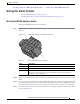
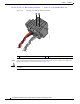
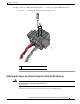
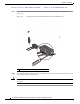

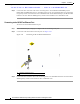


Table Of Contents
- Contents
- Preface
- Overview
- Installation
- Preparing for Installation
- Unpacking the Components
- Installation Guidelines
- Installing the Devices
- Connecting the Protective Ground and Power
- Wiring the Alarm Circuits
- Connecting to Device Ports

29/OCT/2014 REVIEW DRAFT — CISCO CONFIDENTIAL
2-31
Cisco IR500 Series WPAN Gateway and Range Extender Installation and Configuration Guide
Chapter 2 Installation
Wiring the Alarm Circuits
Figure 2-22 Securing the Alarm Connections Captive Screws
391220
1
1 Alarm connections captive screws
Attaching the Power and Alarm Connector to the WPAN Gateway
Warning
This product relies on the building’s installation for short-circuit (overcurrent) protection. Ensure that
the protective device is rated not greater than: 2A
Statement 1005
To attach the power and alarm connector to the front panel of WPAN gateway: