
User's Manual
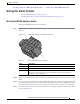



Table Of Contents
- Contents
- Preface
- Overview
- Installation
- Preparing for Installation
- Unpacking the Components
- Installation Guidelines
- Installing the Devices
- Connecting the Protective Ground and Power
- Wiring the Alarm Circuits
- Connecting to Device Ports

29/OCT/2014 REVIEW DRAFT — CISCO CONFIDENTIAL
2-33
Cisco IR500 Series WPAN Gateway and Range Extender Installation and Configuration Guide
Chapter 2 Installation
Connecting to Device Ports
Connecting to Device Ports
• Connecting to WPAN Gateway Ports, page 2-33
• Connecting to WPAN Range Extender Ports, page 2-37
Connecting to WPAN Gateway Ports
• Connecting to the RS232DCE/RS485 or RS232-DTE Ports, page 2-33
• Connecting to the 10/100 Fast Ethernet Port, page 2-34
• Connecting to the USB Port, page 2-35
• Connecting to the Console Port, page 2-36
Connecting to the RS232DCE/RS485 or RS232-DTE Ports
To connect to the RS232DCE/RS485 or RS232-DTE Ports:
Step 1 Use a twisted four-pair, Category 5 or higher cable for connecting to the port.
Step 2 Connect the cable to the RJ-45 connector port. See Figure 2-24.
Figure 2-24 Connecting to the RS232DCE/RS485 or RS232-DTE Ports
391438
2
1
1 RS232DCE/RS485 port
2 RS232-DTE port