
User's Manual
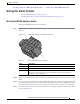
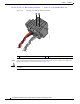
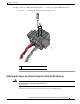
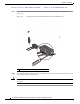

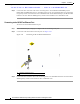

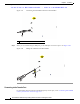

Table Of Contents
- Contents
- Preface
- Overview
- Installation
- Preparing for Installation
- Unpacking the Components
- Installation Guidelines
- Installing the Devices
- Connecting the Protective Ground and Power
- Wiring the Alarm Circuits
- Connecting to Device Ports

29/OCT/2014 REVIEW DRAFT — CISCO CONFIDENTIAL
2-36
Cisco IR500 Series WPAN Gateway and Range Extender Installation and Configuration Guide
Chapter 2 Installation
Connecting to Device Ports
Figure 2-27 Connecting the USB Cable Connector to the USB Port
391609
1
1 USB cable connector
Step 3 When you are finished using the USB port, put the USB port cover back in place. See Figure 2-28.
Figure 2-28 Placing the USB Port Cover Back in Place
391608
1
Connecting to the Console Port
For information about connecting to the WPAN gateway console port, see the “Connecting to the WPAN
Gateway Console Port” section on page 5-13.