
Installation Instructions Chapter 2b

Ripwave Base Station I&C Guide Navini Networks, Inc.
Chapter 2b
60 Part #40-00047-03 Rev F v1.0 (TTA)
October 23, 2003
Install GPS Antennas
Check all regulatory standards (refer to Chapter 1, Page 8 “Regulatory Information”) prior to
installation.
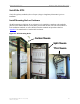
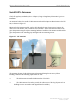
As mentioned earlier, the model of GPS antenna used with the Ripwave Base Station is the VIC
100, as shown in Figure 27.
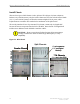
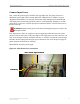
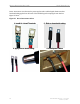
Mount each GPS antenna module, run the cable through the pipe clamp mount. Connect the
cable to the GPS antenna, then, weatherize the connection. Secure the antenna module to the
pipe clamp mount using the captive mounting hardware. Install the GPS antenna module and the
pipe clamp mount to the mounting pipe and tighten the two mounting screws.
Figure 27: VIC 100 GPS
The mounting location for the GPS antenna is determined during the site survey. When
installing, ensure that the following requirements are met:
?? The GPS antenna is installed within 100 feet of the BTS.
?? The GPS antenna is located to provide the widest view of the sky (objects such as
buildings or trees can interfere with signals from the satellite).
Mounting Screws
Antenna
Mounting Hardware
Mounting Screws
Antenna
Mounting Hardware