
Installation Instructions Chapter 2d

Ripwave Base Station I&C Guide Navini Networks, Inc.
Chapter 2d
66 Part #40-00047-05 Rev F v1.0 (TTA)
October 23, 2003
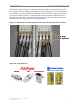
Install Cables Between the RFS & BTS
Connect all of the cables – the eight antenna cables, the calibration cable and the data/power
cable – to the surge protectors on the RFS. For ease of installation, install the cables from the
inside out. Ensure that the proper cable is connected to the proper antenna (Figure 35). Torque
the RF cable connectors to 20-24 inch-pounds.
Figure 35: Completed Cable Installation at the Antenna
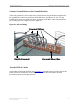
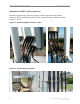
Install Grounding Kit on Cables
Install grounding kit wire connections on the eight (8) RFS cables and the one (1) CAL cable per
the instruction sheet that comes with the grounding kit. Install the grounding wire in a position
on the cable so that it can be attached to the ground buss bar that is mounted close to the RFS.
More than one ground buss bar may be installed in the system, depending on the length of the
cable run. Reference the Regulatory Information in Chapter 1, Page 8.
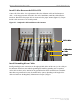
6 2 5 18 4 7 3
Calibration
Cable
Data/Power
Cable
RF Cables
6 2 5 18 4 7 3
Calibration
Cable
Data/Power
Cable
RF Cables