
User Manual




14 OL-19963-01
Phone Screen Navigation and Item Selection
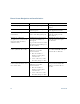
Task Action Example
Scroll to highlight an item. Press the Navigation pad. Highlight a call from the missed
call list.
Select an item by number. Press the corresponding number
on th
e keypad.
Press 2 to select the second item
in the Applications menu.
Select an item using the
Se
lect button.
Press the Select button (at the
center of the Navigation pad).
Highlight the Preferences
application and press the
Select button.
Navigate to a submenu.
(A right arrow (>) next to the
menu
item indicates that a
submenu exists.)
Highlight the menu item and
press the i
tem number on
the keypad.
Or press the down arrow on the
Nav
igation pad and then press
the Select button.
Highlight the Network Setup
menu, then
press 1 to open
the submenu.
Select a line to use a calling
fea
ture (when the line is idle).
Press the line button.
Indicators of your line
selection include:
• The sel
ected line is
displayed on the phone
screen header.
• Color of the i
con (on the
line label) changes to blue.
Press the line button and then
press th
e Forward All softkey to
forward calls on that line.
Select a line to use a calling
feat
ure (when the line has one or
more active calls).
Press the line button twice.
Indicators of your line
selection include:
• The sel
ected line is
displayed on the phone
screen header.
• Color of the i
con (on the
line label) changes to blue.
Press the line button twice and
then press the Forwa
rd All
softkey to forward calls on
that line.