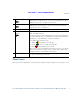
EFT DRAFT - CISCO CONFIDENTIAL Your Phone 16 Applications button Opens/closes the Applications menu. Depending on how your system administrator sets up the phone, use it to access applications such as call history, preferences, and phone information. 17 Contacts button Opens/closes the Contacts menu. Depending on how your system administrator sets up the phone, use it to access personal directory, corporate directory, or call history.
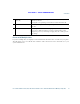
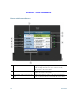
EFT DRAFT - CISCO CONFIDENTIAL Phone with Single Line 1 Line label Displays the line phone information. 2 Header Displays the date and time, and information (such as phone number) about the selected line. 3 Session button label (for connected call) Displays information (such as phone number and duration) about a connected call on the line.
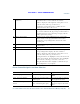
EFT DRAFT - CISCO CONFIDENTIAL Your Phone 4 Session button label (for held call) Displays information (such as phone number and duration) about a held call on the line. Pressing the corresponding session button resumes the held call. 5 New Call icon Indicates you can press the corresponding session button to make a new call. 6 Softkeys Softkey options for the selected (highlighted) call only.
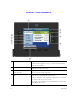
EFT DRAFT - CISCO CONFIDENTIAL 1 Primary line label Displays the primary line phone information. In this example, the blue icon (for Connected Call) indicates this is the selected line. 2 Header Displays the date and time, and information (such as phone number) about the selected line. 3 Session button label (for a connected call) Displays information (such as phone number and duration) about a connected call on the line.
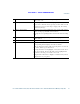
EFT DRAFT - CISCO CONFIDENTIAL Your Phone 5 New Call icon Indicates you can press the corresponding session button to make a new call. 6 Softkeys Softkey options for the selected (highlighted) call only. If you select a different call (by pressing a feature button or the Navigation pad, or by answering a ringing call), the softkey options may change. 7 Answer button label Displays if your system administrator has assigned the Answer feature to the programmable feature button.
EFT DRAFT - CISCO CONFIDENTIAL Phone with Answer Button 1 Primary line label Displays the primary line phone information. In this example, the blue icon (for Connected Call) indicates this is the selected line. 2 Header Displays the date and time, and information (such as phone number) about the selected line. 3 Session label (with Connected Call icon) Displays information (such as call status and duration) about a connected call associated with the selected line.
EFT DRAFT - CISCO CONFIDENTIAL Your Phone 4 Session button labels (with Held Call icons) Display information (such as call status and duration) about held calls associated with the selected line. Calls are displayed on the right side of the phone screen from the oldest (at the top) to the newest. Pressing the session button next to a Held Call icon resumes the held call for that session. 5 Softkeys Softkey options for the selected (highlighted) call only.
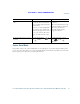
EFT DRAFT - CISCO CONFIDENTIAL Task Action Example Navigate to a submenu. Highlight the menu item and press the item number on the keypad. Highlight the Network Setup menu, then press 1 to open the submenu. (A right arrow (>) next to the menu item indicates there is a submenu.) Select a line to use a calling feature (when line is idle). Or press the down arrow on the Navigation pad and then press the Select button. Press the feature (line) button.
EFT DRAFT - CISCO CONFIDENTIAL Your Phone Task Action Example Change the line view (while on a Select a different line (by call). pressing the line feature button or by scrolling and pressing the Select button). While on a call, press a different line button. Call session information for the newly selected line is displayed. If you are on a call, changing the Call session information line view does not end the call, previously displayed may but it may disappear from view. disappear from view.
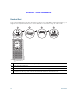
EFT DRAFT - CISCO CONFIDENTIAL Handset Rest Your system administrator may have mounted your phone on a wall. With a wall-mounted phone, you might need to adjust the handset rest to ensure that the receiver will not slip out of the cradle. 2 3 4 275943 1 1 Remove handset from the cradle and pull the plastic tab from the handset rest. 2 Rotate the tab 180 degrees. 3 Hold the tab between two fingers, with the corner notches facing you.
EFT DRAFT - CISCO CONFIDENTIAL Your Phone Cisco Unified IP Phone 9951 The Cisco Unified IP Phone 9951 provides these features: • Phone connections • Footstand • Phone display viewing angle • Buttons and hardware • Phone screen • Power-save mode • Handset rest Phone Connections For your phone to work, it must be connected to the corporate IP telephony network. Your system administrator can help you connect your phone.
EFT DRAFT - CISCO CONFIDENTIAL 8 Computer Computer 193117 Network Network 9 1 7 6 3 2 5 4 20 OL-19963-01
EFT DRAFT - CISCO CONFIDENTIAL Your Phone 1 DC adaptor port (DC48V) 6 Handset connection 2 AC-to-DC power supply (optional) 7 Analog headset connection (optional) 3 AC power wall plug (optional) 8 USB port 4 Network port connection (10/100/1000 SW) with IEEE 802.
EFT DRAFT - CISCO CONFIDENTIAL Footstand If your phone is placed on a table or desk, connect the footstand to the back of the phone. 2 2 1 1 1 2 193118 2 1 1 22 Insert the curved connectors into the lower slots. 2 Lift the footstand until the connectors snap into the upper slots.
EFT DRAFT - CISCO CONFIDENTIAL Your Phone Phone Display Viewing Angle 193119 The phone display viewing angle can be adjusted according to your preference. Buttons and Hardware Your phone provides quick access to your phone lines, features, and call sessions. Use the feature buttons (on the left) to view calls on a line or access features such as speed dial or All Calls. Use the call session buttons (on the right) to perform tasks such as making a call, answering a call, or resuming a held call.
EFT DRAFT - CISCO CONFIDENTIAL 1 20 2 19 18 3 17 4 16 5 15 6 14 13 12 11 24 10 9 8 194674 7 OL-19963-01
EFT DRAFT - CISCO CONFIDENTIAL Your Phone 1 Phone screen Shows information about your phone, including directory number, call information (for example caller ID, icons for an active call or call on hold) and available softkeys. 2 Session buttons Each represents a call session and takes the default action for that session. For example, pressing the session button for a ringing call answers the call, while pressing the session button for a held call resumes the call. Color LEDs reflect the call state.
EFT DRAFT - CISCO CONFIDENTIAL 6 Navigation pad and Select button The four-way Navigation pad allows you to scroll through menus, highlight items, and move within a text input field. The Select button (center of the Navigation pad) allows you to select a highlighted item. The Select button is lit (white) when the phone is in power-save mode. 7 Conference button Creates a conference call. 8 Hold button Places a connected call on hold. 9 Transfer button Transfers a call.
EFT DRAFT - CISCO CONFIDENTIAL Your Phone 16 Applications button Opens/closes the Applications menu. Depending on how your system administrator sets up the phone, use it to access applications such as call history, preferences, and phone information. 17 Contacts button Opens/closes the Contacts menu. Depending on how your system administrator sets up the phone, use it to access personal contacts, corporate directory, or call history.
EFT DRAFT - CISCO CONFIDENTIAL Phone with Single Line 1 Line label Displays the line phone information. 2 Header Displays the date and time, and information (such as phone number) about the selected line. 3 Session label (for connected call) Displays information (such as phone number and duration) about a connected call on the line.
EFT DRAFT - CISCO CONFIDENTIAL Your Phone 4 Session button label (for held call) Displays information (such as phone number and duration) about a held call on the line. Pressing the corresponding session button resumes the held call. 5 New Call icon Indicates you can press the corresponding session button to make a new call. 6 Softkeys Softkey options for the selected (highlighted) call only.
EFT DRAFT - CISCO CONFIDENTIAL 1 Primary line label Displays the primary line phone information. In this example, the blue icon (for Connected Call) indicates this is the selected line. 2 Header Displays the date and time, and information (such as phone number) about the selected line. 3 Session label (for a connected call) Displays information (such as phone number and duration) about a connected call on the line.
EFT DRAFT - CISCO CONFIDENTIAL Your Phone 5 New Call icon Indicates you can press the corresponding session button to make a new call. 6 Softkeys Softkey options for the selected (highlighted) call only. If you select a different call (by pressing a feature button or the Navigation pad, or by answering a ringing call), the softkey options may change. 7 Answer button label Displays if your system administrator has assigned the Answer feature to the programmable feature button.
EFT DRAFT - CISCO CONFIDENTIAL Phone with Answer Button 1 Primary line label Displays the primary line phone information. In this example, the blue icon (for Connected Call) indicates this is the selected line. 2 Header Displays the date and time, and information (such as phone number) about the selected line. 3 Session label (with Connected Call icon) Displays information (such as call status and duration) about a connected call associated with the selected line.
EFT DRAFT - CISCO CONFIDENTIAL Your Phone 4 Session button labels (with Held Call icons) Display information (such as call status and duration) about held calls associated with the selected line. Calls are displayed on the right side of the phone screen from the oldest (at the top) to the newest. Pressing the session button next to a Held Call icon resumes the held call for that session. 5 Softkeys Softkey options for the selected (highlighted) call only.
EFT DRAFT - CISCO CONFIDENTIAL Task Action Example Navigate to a submenu. Highlight the menu item and press the item number on the keypad. Highlight the Network Setup menu, then press 1 to open the submenu. (A right arrow (>) next to the menu item indicates there is a submenu.) Select a line to use a calling feature (when line is idle). Or press the down arrow on the Navigation pad and then press the Select button. Press the feature (line) button.
EFT DRAFT - CISCO CONFIDENTIAL Your Phone Task Action Example Change the line view (while on a Select a different line (by call). pressing the line button or scrolling and pressing the Select button). While on a call, press a different line button. Call session information for the newly selected line is displayed. If you are on a call, changing the Call session information line view does not end the call, previously displayed may but it may disappear from view. disappear from view.
EFT DRAFT - CISCO CONFIDENTIAL Handset Rest Your system administrator may have mounted your phone on a wall. With a wall-mounted phone, you might need to adjust the handset rest to ensure that the receiver will not slip out of the cradle. 2 3 4 275943 1 1 Remove handset from the cradle and pull the plastic tab from the handset rest. 2 Rotate the tab 180 degrees. 3 Hold the tab between two fingers, with the corner notches facing you.
EFT DRAFT - CISCO CONFIDENTIAL Your Phone Cisco Unified IP Phone 9971 The Cisco Unified IP Phone 9971 provides these features: • Phone connections • Footstand • Phone display viewing angle • Buttons and hardware • Phone screen • Power-save mode • Phone display cleaning • Handset rest Phone Connections For your phone to work, it must be connected to the corporate IP telephony network. Your system administrator can help you connect your phone.
EFT DRAFT - CISCO CONFIDENTIAL 8 Computer Computer 193117 Network Network 9 1 7 6 3 2 5 4 38 OL-19963-01
EFT DRAFT - CISCO CONFIDENTIAL Your Phone 1 DC adaptor port (DC48V) 6 Handset connection 2 AC-to-DC power supply (optional for the network port connection but required for a wifi connection) 7 Analog headset connection (optional) 3 AC power wall plug (optional) 8 USB port 4 Network port connection (10/100/1000 SW) with IEEE 802.3af and IEEE 802.
EFT DRAFT - CISCO CONFIDENTIAL Wireless Connection Your phone can be connected to a wireless network using 802.11a or 802.11b/g, but the connection must be set up by your system administrator. For more information, see your system administrator. Footstand If your phone is placed on a table or desk, connect the footstand to the back of the phone. 2 2 1 1 1 2 193118 2 1 1 40 Insert the curved connectors into the lower slots. 2 Lift the footstand until the connectors snap into the upper slots.
EFT DRAFT - CISCO CONFIDENTIAL Your Phone Phone Display Viewing Angle 193119 The phone display viewing angle can be adjusted according to your preference. Buttons and Hardware Your phone provides quick access to your phone lines, features, and call sessions. Use the feature buttons (on the left) to view calls on a line or access features such as speed dial or All Calls. Use the call session buttons (on the right) to perform tasks such as making a call, answering a call, or resuming a held call.
EFT DRAFT - CISCO CONFIDENTIAL 1 19 2 18 17 16 3 15 4 14 5 13 12 11 10 42 9 8 7 194675 6 OL-19963-01
EFT DRAFT - CISCO CONFIDENTIAL Your Phone 1 Phone screen Shows information about your phone, including directory number, call information (for example caller ID, icons for an active call or call on hold) and available softkeys. Phone screen items, such as menu options and softkeys, are touch-sensitive. 2 Session buttons Each represents a call session and takes the default action for that session.