
User's Manual





30 OL-19963-01
EFT DRAFT - CISCO CONFIDENTIAL
1
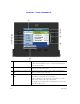
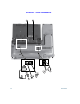
Primary line label Displays the primary line phone information.
In this example, the blue icon (for Connected Call) indicates
this is the selected line.
2
Header Displays the date and time, and information (such as phone
number) about the selected line.
3
Session label (for a connected
call)
Displays information (such as phone number and duration)
about a connected call on the line.
4
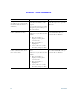
Session button labels (for held
calls)
Display information (such as call status and duration) about
held calls associated with the selected line.
Calls are displayed on the right side of the phone screen in
order of the oldest (at the top) to the newest.
Pressing the session button next to a Held Call icon resumes the
held call for that session.