
User's Manual





Your Phone
Cisco Unified IP Phone 8961, 9951, and 9971 User Guide for Cisco Unified Communications Manager 7.1(3) (SIP) 31
EFT DRAFT - CISCO CONFIDENTIAL
5
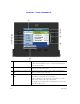
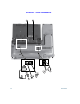
New Call icon Indicates you can press the corresponding session button to
make a new call.
6
Softkeys Softkey options for the selected (highlighted) call only.
If you select a different call (by pressing a feature button or the
Navigation pad, or by answering a ringing call), the softkey
options may change.
7
Answer button label Displays if your system administrator has assigned the Answer
feature to the programmable feature button.
Pressing the corresponding button answers the oldest incoming
call.
8
Speed-dial button label Displays if you assigned a speed dial to the programmable
feature button.
9
Nonprimary line labels Displays the nonprimary line phone information.
10
All Calls button label Displays if the All Calls feature is enabled. Pressing the
corresponding button displays all calls on all lines.
Calls are displayed on the right side of the phone screen from
the oldest (at the top) to the newest.
Pressing the button once highlights (selects) the current call or
first call on the list. Pressing the button twice highlights the
header line, allowing you to make a new call.
Using the All Calls feature is highly recommended if you have
multiple lines on your phone.