
User's Manual





Your Phone
Cisco Unified IP Phone 8961, 9951, and 9971 User Guide for Cisco Unified Communications Manager 7.1(3) (SIP) 41
EFT DRAFT - CISCO CONFIDENTIAL
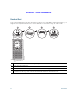
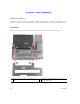
Phone Display Viewing Angle
The phone display viewing angle can be adjusted according to your preference.
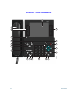
Buttons and Hardware
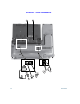
Your phone provides quick access to your phone lines, features, and call sessions. Use the feature
buttons (on the left) to view calls on a line or access features such as speed dial or All Calls. Use the
call session buttons (on the right) to perform tasks such as making a call, answering a call, or resuming
a held call.
193119