
Installation guide


1-8
Catalyst 3560 Switch Hardware Installation Guide
OL-6337-03
Chapter 1 Product Overview
Front Panel Description
For information about Cisco IP Phones and Cisco Aironet Access Points, see the documentation that
came with your IP phone or access point.
Note 100BASE-TX and 1000BASE-T traffic requires Category 5 cable. 10BASE-T traffic can use Category 3
or Category 4 cables.
When connecting the switch to workstations, servers, routers, and Cisco IP Phones, be sure that the cable
is a straight-through cable. When connecting the switch to switches or hubs, use a crossover cable. When
using a straight-through or crossover cable for 1000BASE-T connections, be sure to use a twisted
four-pair, Category 5 cable for proper operation. Pinouts for the cables are described in Appendix B,
“Connector and Cable Specifications.”
Note You can use the mdix auto interface configuration command in the CLI to enable the automatic
medium-dependent interface crossover (Auto-MDIX) feature. When the Auto-MDIX feature is enabled,
the switch detects the required cable type for copper Ethernet connections and configures the interfaces
accordingly. Therefore, you can use either a crossover or a straight-through cable for connections to a
copper 10/100, 10/100/1000, or 1000BASE-T SFP module port on the switch, regardless of the type of
device on the other end of the connection.
The Auto-MDIX feature is enabled by default on switches running Cisco IOS Release 12.2(18)SE or
later. For releases between Cisco IOS Release 12.1(14)EA1 and 12.2(18)SE, the Auto-MDIX feature is
disabled by default. For configuration information for this feature, see the switch software configuration
guide or the switch command reference.
Note Many legacy powered devices, including older Cisco IP phones and access points that do not fully
support IEEE 802.3af, might not support PoE when connected to the switches by a crossover cable.
SFP Module Slots
The SFP module slots support the SFP modules that are listed in the Catalyst 3560 release notes.
SFP Modules
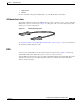
The Catalyst 3560 switch uses Gigabit Ethernet SFP modules to establish fiber-optic and 1000BASE-T
connections. These transceiver modules are field-replaceable, providing the uplink interfaces when
inserted in an SFP module slot. You can use the SFP modules for Gigabit uplink connections to other
switches. You use fiber-optic cables with LC or MT-RJ connectors to connect to a fiber-optic SFP
module. You use Category 5 cable with RJ-45 connectors to connect to a copper SFP module.
The Catalyst 3560 models support these Cisco SFP modules:
• 1000BASE-LX
• 1000BASE-SX
• 1000BASE-ZX
• 1000BASE-T