
Installation guide


Contents
iv
Catalyst 3560 Switch Hardware Installation Guide
OL-6337-03
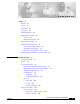
Console Port 1-15
Management Options 1-15
Network Configurations 1-17
CHAPTER
2 Switch Installation 2-1
Preparing for Installation 2-1
Warnings 2-2
Installation Guidelines 2-4
Verifying Package Contents 2-6
Verifying Switch Operation 2-6
Powering Off the Switch 2-7
Installing the Switch 2-7
Rack-Mounting 2-7
Removing Screws from the Switch 2-8
Attaching Brackets to the Catalyst 3560 Switch 2-9
Mounting the Switch in a Rack 2-11
Attaching the Cable Guide 2-12
Wall-Mounting 2-12
Attaching the Brackets to the Switch for Wall Mounting 2-13
Attaching the RPS Connector Cover 2-13
Mounting the Switch on a Wall 2-14
Table- or Shelf- Mounting 2-15
Installing and Removing SFP Modules 2-15
Installing SFP Modules into SFP Module Slots 2-16
Removing SFP Modules from SFP Module Slots 2-17
Inserting and Removing the SFP Module Patch Cable 2-18
Connecting to the 10/100 or 10/100/1000 Ports 2-19
Connecting to SFP Modules 2-21
Connecting to Fiber-Optic SFP Modules 2-21
Connecting to 1000BASE-T SFP Modules 2-22
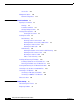
Where to Go Next 2-23
CHAPTER
3 Troubleshooting 3-1
Understanding POST Results 3-1
Diagnosing Problems 3-1