
Installation guide
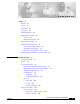


Contents
v
Catalyst 3560 Switch Hardware Installation Guide
OL-6337-03
APPENDIX
A Technical Specifications A-1
APPENDIX
B Connector and Cable Specifications B-1
Connector Specifications B-1
10/100 and 10/100/1000 Ports B-1
SFP Module Ports B-3
Console Port B-3
Cable and Adapter Specifications B-4
Two Twisted-Pair Cable Pinouts B-4
Four Twisted-Pair Cable Pinouts for 1000BASE-T Ports B-4
Crossover Cable and Adapter Pinouts B-5
Identifying a Crossover Cable B-5
Adapter Pinouts B-6
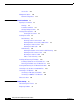
APPENDIX
C Configuring the Switch with the CLI-Based Setup Program C-1
Accessing the CLI C-1
Accessing the CLI Through Express Setup C-1
Accessing the CLI Through the Console Port C-2
Taking Out What You Need C-2
Connecting to the Console Port C-3
Starting the Terminal-Emulation Software C-4
Connecting to a Power Source C-5
Entering the Initial Configuration Information C-6
IP Settings C-6
Completing the Setup Program C-6
I
NDEX