
Installation guide






2-16
Catalyst 3560 Switch Hardware Installation Guide
OL-6337-03
Chapter 2 Switch Installation
Installing and Removing SFP Modules
Installing SFP Modules into SFP Module Slots
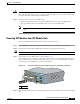
Figure 2-13 shows an SFP module that has a bale-clasp latch.
Caution We strongly recommend that you do not install or remove fiber-optic SFP modules with cables attached
because of the potential damage to the cables, the cable connector, or the optical interfaces in the SFP
module. Disconnect all cables before removing or installing an SFP module.
Removing and installing an SFP module can shorten its useful life. Do not remove and insert SFP
modules more often than is absolutely necessary.
Figure 2-13 SFP Module with a Bale-Clasp Latch
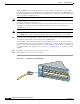
To insert an SFP module into the module slot, follow these steps:
Step 1 Attach an ESD-preventive wrist strap to your wrist and to a bare metal surface on the chassis.
Step 2 Find the send (TX) and receive (RX) markings that identify the top side of the SFP module.
Note On some SFP modules, the send and receive (TX and RX) markings might be replaced by arrows
that show the direction of the connection, either send or receive (TX or RX).
Step 3 Align the SFP module in front of the slot opening.
Step 4 Insert the SFP module into the slot until you feel the connector on the module snap into place in the rear
of the slot.
Figure 2-14 Installing an SFP Module into an SFP Module Slot
Step 5 For fiber-optic SFP modules, remove the dust plugs from the optical ports, and store them for later use.
86575
40
41
42
43
44
45
46
47 48
47X
48X
Catalyst 3560
SERIES
PoE-48
1
2
3
4
97928