
User Manual
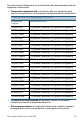
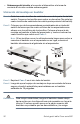
Table Of Contents
- Mounting the Cisco Switch
- Connecting Network Devices
- Configuring the Cisco 300 Series Managed Switch
- Features of the Cisco 300 Series Managed Switch
- Returning the Device to the Factory Default Settings
- Where to Go From Here
- Montaje del switch de Cisco
- Conexión de los dispositivos de red
- Configuración del Cisco 300 Series Managed Switch
- Características del switch administrado Cisco serie 300
- Cómo restablecer la configuración predeterminada de fábrica del dispositivo
- Cómo seguir
- Montage du commutateur Cisco
- Connexion des périphériques réseau
- Configuration du Commutateur administrable Cisco
- Fonctionnalités du commutateur administrable Cisco série 300
- Restauration de la configuration d'origine de l'appareil
- Pour en savoir plus

14 Cisco 300 Series Managed Switches
Console—The Console port is where you can connect a serial cable to a
computers serial port for configuration using a terminal emulation program.
Returning the Device to the Factory
Default Settings
To use the Reset button to reboot or reset the managed switch, do the
following:
•To reboot the managed switch, press the Reset button for less than 10
seconds.
• To restore the managed switch configuration to the factory default
settings:
1. Disconnect the managed switch from the network or disable all
DHCP servers on your network.
2. With the power on, press-and-hold the Reset button for more than
10 seconds.
5