
Administrator's Guide

Configuring Device Security
Defining Access Control
Cisco Small Business SFE/SGE Managed Switches Administration Guide 93
4
To d e f i n e t h e M A C B a s e d A C L :
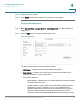
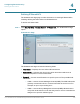
STEP 1 Click Security Suite >Access Control > MAC Based ACL. The
MAC Based ACL
Page
opens:
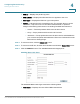
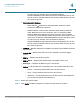
MAC Based ACL Page
The
MAC Based ACL Page
contains the following fields:
• ACL Name — Displays the user-defined MAC based ACLs.
• Priority — Indicates the ACE priority, which determines which ACE is matched
to a packet on a first-match basis. The possible field values are 1-2147483647.
• Source MAC Address — Defines the source MAC address to match the ACE.
• Source MAC Mask — Defines the source MAC mask to match the ACE.
• Destination MAC Address — Defines the destination MAC address to match
the ACE.
• Destination MAC Mask — Defines the destination MAC mask to the which
packets are matched.
• VLAN ID — Matches the packet’s VLAN ID to the ACE. The possible field values
are 1 to 4093.
• Inner VLAN — Matches the ACE to the inner VLAN ID of a double tagged
packet.