
Administrator's Guide

Configuring Device Security
Defining Access Control
Cisco Small Business SFE/SGE Managed Switches Administration Guide 122
4
For each entry, an interface has a bound ACL.
• Interface — Indicates the interface to which the associated ACL is bound.
• ACL Name — Indicates the ACL which is bound to the associated interface.
• Type — Indicates the ACL type to which is bound to the interface.
STEP 2 Modify the relevant fields.
STEP 3 Click Apply. The settings are defined, and the device is updated.
Modifying ACL Binding
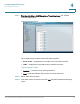
STEP 1 Click Security Suite > Access Control > ACL Binding. The
ACL Binding Page
opens:
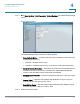
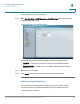
STEP 2 Click the Edit button. The
Edit ACL Binding Page
opens:
Edit ACL Binding Page
The
Edit ACL Binding Page
contains the following fields:
• Interface — Indicates the interface to which the ACL is bound.
• Select MAC Based ACL — Indicates the MAC based ACL which is bound to the
interface.
• Select IPv4 Based ACL — Indicates the IPv4 based ACL which is bound to the
interface.
• Select IPv6 Based ACL — Indicates the IPv6 based ACL which is bound to the
interface.
STEP 3 Define the relevant fields.