
Administrator's Guide

Configuring Device Security
Defining DoS Prevention
Cisco Small Business SFE/SGE Managed Switches Administration Guide 124
4
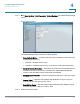
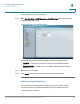
STEP 1 Click Security Suite > DoS Prevention > Global Settings. The
Global Settings Page
opens:
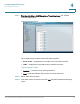
Global Settings Page
The
Global Settings Page
contains the following fields:
• Security Suite Status — Indicates if DoS security is enabled on the device. The
possible field values are:
•
Enabled
— Enables DoS security.
•
Disabled
— Disables DoS security on the device. This is the default value.
• Denial of Service Protection — Indicates if any of the services listed below are
enabled. If the service protection is disabled, the
Stacheldraht Distribution
,
Invasor Trojan
, and
Back Orifice Trojan
fields
are disabled.
• Stacheldraht Distribution — Discards TCP packets with source TCP port equal
to 16660
• Invasor Trojan — Discards TCP packets with destination TCP port equal to
2140 and source TCP port equal to 1024.
• Back Orifice Trojan — Discards UDP packets with destination UDP port equal
to 31337 and source UDP port equal to 1024.
STEP 2 Define the relevant fields.