
Administrator's Guide

Configuring VLANs
Defining VLAN Membership
Cisco Small Business SFE/SGE Managed Switches Administration Guide 168
6
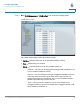
STEP 1 Click Bridging > VLAN Management > Port to VLAN. The
Port to VLAN
Page
opens:
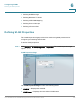
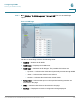
Port to VLAN Page
The Port to VLAN Page contains the following fields:
• VLAN ID — Selects the VLAN ID.
• VLAN Name — Displays the VLAN name.
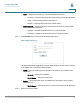
• VLAN Type — Indicates the VLAN type. The possible field values are:
-
Dynamic
— Indicates the VLAN was dynamically created through GVRP.
-
Static
— Indicates the VLAN is user-defined.
-
Default
— Indicates the VLAN is the default VLAN.
• Ports of Unit — Indicates that ports on the specified stacking member are
described in the page.
• LAGs — Indicates that LAGs are described in the page.
• Interface — Displays the interface configuration being displayed.