
Administrator's Guide


Configuring Spanning Tree
Defining Spanning Tree
Cisco Small Business SFE/SGE Managed Switches Administration Guide 253
10
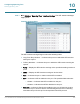
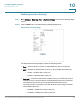
STEP 1 Click Bridging > Spanning Tree > Interface Settings. The STP
Interface Settings
Page
opens:
Interface Settings Page
The STP
Interface Settings Page
contains the following fields:
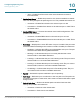
• Copy From Entry Number — Indicates the port from which the STP interface
setting are copied.
• To Entry Numbers — Indicates the port to which the STP interface setting are
copied.
• Ports — Display the STP Interface settings of the specified stacking member’s
ports.
• LAGs — Display the STP Interface settings of device LAGs.
• Port — Indicates the port or LAG on which STP is enabled.
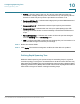
• STP — Indicates if STP is enabled on the port. The possible field values are:
-
Enable
— Indicates that STP is enabled on the port.
-
Disable
— Indicates that STP is disabled on the port.
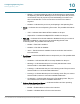
• Port Fast — Indicates if Fast Link is enabled on the port. If Fast Link mode is
enabled for a port, the Port State is automatically placed in the Forwarding
state when the port link is up. Fast Link optimizes the STP protocol