
Administrator's Guide

Aggregating Ports
Defining LAG Settings
Cisco Small Business SFE/SGE Managed Switches Administration Guide 397
18
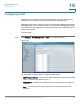
• Copy From Entry Number — Copies the LAG configuration from the specified
table entry.
• To Entry Number(s) — Assigns the copied LAG configuration to the specified
table entry.
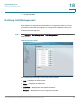
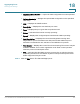
• LAG — Displays the LAG ID number.
• Description — Displays the user-defined port name.
• Type — Displays the port types that comprise the LAG.
• Status — Indicates if the LAG is currently operating.
• Speed — Displays the configured speed at which the LAG is operating.
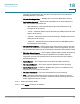
• Auto Negotiation — Displays the current Auto Negotiation setting. Auto
Negotiation is a protocol between two link partners that enables a port to
advertise its transmission rate, and flow control abilities to its partner.
• Flow Control — Displays the current Flow Control setting. Flow control may be
enabled, disabled, or be in auto negotiation mode. Flow control operates
when the ports are in full duplex mode.
• PVE — Indicates that this LAG’s ports are protected by an uplink, so that the
forwarding decisions are overwritten by those of the ports that protect them.
PVE is supported in Layer 2 mode.
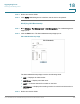
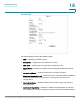
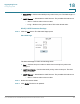
STEP 2 Click the Edit button. The
Edit LAG Page
opens: