
Administrator's Guide

Aggregating Ports
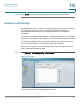
Defining LAG Settings
Cisco Small Business SFE/SGE Managed Switches Administration Guide 398
18
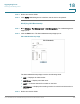
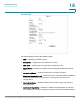
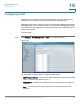
Edit LAG Page
The
Edit LAG Page
contains the following fields:
• LAG — Displays the LAG ID number.
• Description — Displays the user-defined port name.
• LAG Type — Indicates he port types that comprise the LAG.
• Admin Status — Enables or disables traffic forwarding through the selected
LAG.
• Current LAG Status — Indicates if the LAG is currently operating.
• Reactivate Suspended LAG — Reactivates a port if the LAG has been disabled
through the locked port security option or through Access Control List
configurations.
• Operational Status — Indicates whether the LAG is currently operational or
non-operational.
• Admin Auto Negotiation — Enables or disables Auto Negotiation on the LAG.
Auto-negotiation is a protocol between two link partners that enables a LAG to