
Administrator's Guide

Configuring Device Security
Defining 802.1X
Cisco Small Business SFE/SGE Managed Switches Administration Guide 83
4
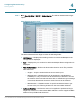
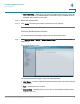
STEP 1 Click Security Suite > 802.1X > Port Authentication. The
802.1X Port Authentication
Page
opens:
802.1X Port Authentication Page
The
802.1X Port Authentication Page
contains the following fields:
• Copy from Entry Number — Copies the port authentication configuration from
the specified table entry.
• To Entry Number(s) — Assigns the copied port authentication configuration to
the specified table entry.
• Unit Number — Displays the stacking member for which the port
authentication parameters are displayed.
• Port — Displays the list of interfaces.
• User Name — Displays the user name.
• Current Port Control — Displays the current port authorization state.
• Guest VLAN — Displays the Guest VLAN.
• Authentication Method — Displays the authentication method in use.
• Periodic Reauthentication — Enables port reauthentication. The default value is
disabled.