
Operation Manual



6. SETTING PREFERENCES
Accessing the on-screen display menus
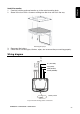
1. Press SETUP on the remote to access the OSD menus.
The main Display menu appears.
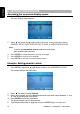
General setup page
2. Press (left arrow) and (right arrow) to alternate among three option pages:
GENERAL SETUP PAGE, SPEAKER SETUP PAGE and PREFERENCE PAGE.
Note:
To access the PREFERENCE PAGE the DVD slot must be empty.
Eject any DVD or CD in the drive.
4. Press ENTER to select the option you wish to change.
5. Press ENTER to confirm your selection.
6. Press SETUP to exit the on-screen display menus.
Example: Setting parental control
1. Press SETUP, then press
(right arrow) to display the PREFERENCE PAGE.
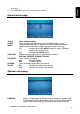
The system displays the OSD menu.
Preference page
2. Press five times to select Parental.
3. Press to increase and to decrease the level of parental control between “1” and
“8” with “8” providing the most control.
4. Press ENTER to save this preference.
The player prompts you for the password.
5. Type the password (refer to page 30) and press ENTER again to confirm the
OHM888VD / OHM1088VD / OHM1588VD 28